Reports
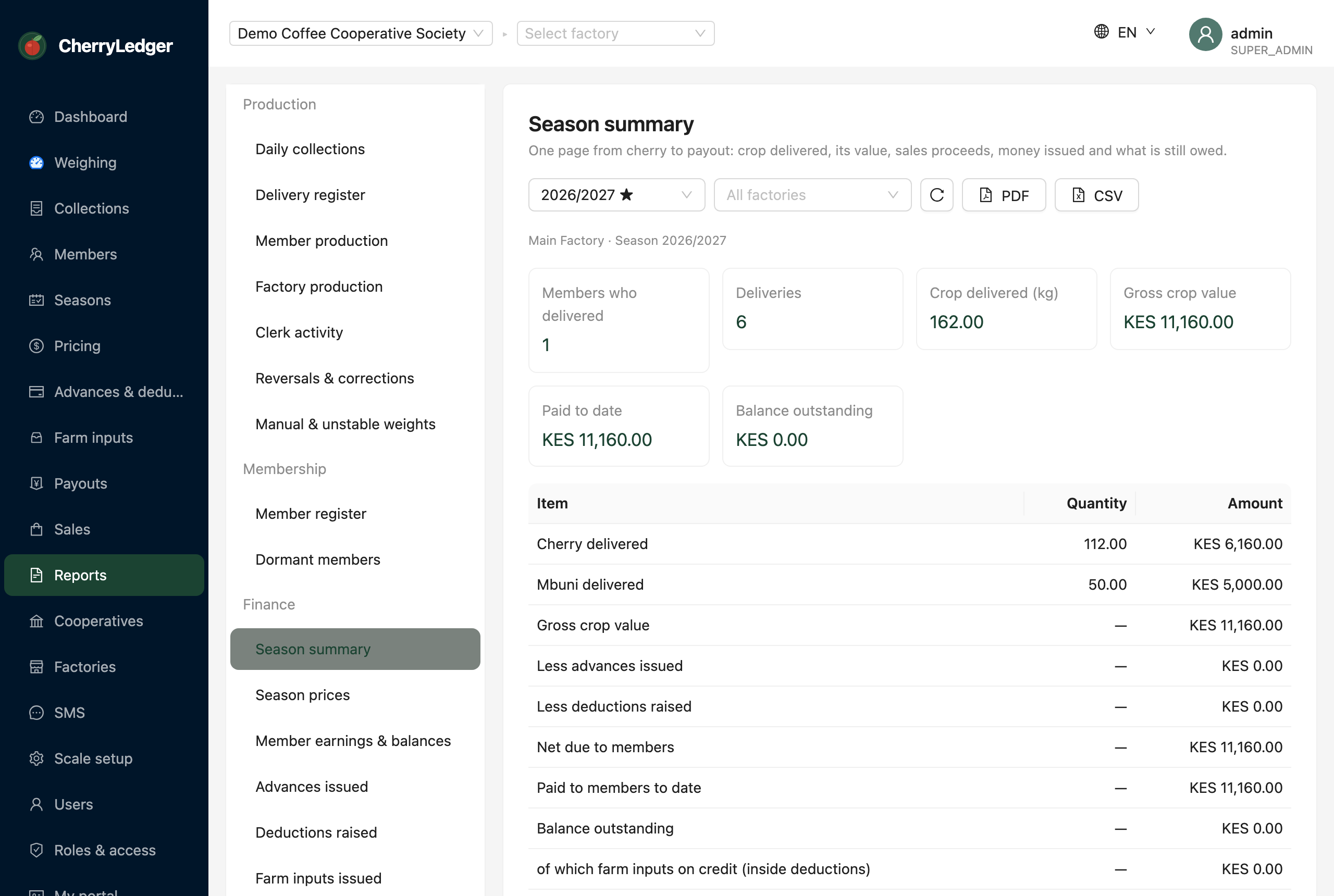
The Reports screen is the cooperative's reporting centre: 21 standard reports covering production, membership, finance and compliance. Every report can be viewed on screen, printed as a PDF, or downloaded as a CSV for Excel.
Permission required: REPORT_VIEW (a few reports also need the permission for their own module —
see Who can see what).
How it works
- Pick a report from the list on the left — they're grouped into Production, Membership, Finance and Compliance.
- Set the parameters above the table. Each report asks only for what it needs: a date range, a season, a factory, or a payout run.
- Read the figures on screen, then use PDF (branded, ready to file or hand to a board meeting) or CSV (opens in Excel) if you need a copy.
Everything is scoped to what you may see
A report never shows another cooperative's data. If you're assigned to one factory, you see that factory; admins can pick All factories or switch the active factory in the header.
Production
| Report | Answers |
|---|---|
| Daily collections | How much came in each day, split by cherry and mbuni, and how many farmers were served. |
| Delivery register | Every single delivery in the period with its receipt number, weight and how the weight was captured. |
| Member production | Who delivered what this season, ranked — your top growers and everyone's totals. |
| Factory production | Each factory's season output side by side, with its share of the total. |
| Clerk activity | How many deliveries each clerk recorded, and how much of it was manual — a workload and supervision view. |
| Reversals & corrections | Every reversed delivery, who reversed it and why. Review this regularly. |
| Manual & unstable weights | Deliveries whose weight wasn't captured cleanly from the scale — the ones worth a second look. |
Membership
| Report | Answers |
|---|---|
| Member register | The full membership roll with member numbers, contacts and bank details. |
| Dormant members | Members who delivered nothing this season — for follow-up or cleaning the register. |
Finance
| Report | Answers |
|---|---|
| Season summary | One page from cherry to payout: crop delivered, its value, sales proceeds, money issued and what's still owed. |
| Season prices | The advance, final and bonus rates set for the season, and whether the final price is set. |
| Member earnings & balances | Per member: kilos, gross value, advances, deductions and net payable. The workbook behind a payout. |
| Advances issued | Every cherry advance in the season and how much is still to be recovered. |
| Deductions | Every deduction raised, by type, and what's been recovered. |
| Farm inputs issued | Inputs given on credit, their value, and the deduction each one created. |
| Coffee sales | Lots sold, buyers, proceeds and costs — the money coming in. |
| Payout runs | Every payout run for the season with its status, member count and total. |
| Payout register | Line-by-line detail of one payout run — what each member was paid. |
| Bank disbursement list | The bank-ready list for one run: name, bank, account number and amount. |
Provisional vs realised
Money figures follow the same rule as member statements: until the realised price is applied they're provisional and the report says so.
Compliance
| Report | Answers |
|---|---|
| Audit trail | Who did what and when — every recorded action in the period. |
| SMS log | Every message sent, to whom, and whether it was delivered. |
Who can see what
REPORT_VIEW opens the Reports screen and the production, membership and season reports. Reports over
sensitive modules also require that module's read permission, so a user only sees the reports they'd be
allowed to see the underlying screens for:
| Report | Also needs |
|---|---|
| Advances issued | ADVANCE_READ |
| Deductions | DEDUCTION_READ |
| Farm inputs issued | INPUT_READ |
| Coffee sales | SALE_READ |
| Payout runs, Payout register, Bank disbursement list | PAYOUT_READ |
| Audit trail | AUDIT_READ |
| SMS log | SMS_READ |
Reports you aren't permitted to run simply don't appear in the list.
Related
- A single farmer's season on one page: Member statements.
- The live at-a-glance numbers: the Dashboard.
- Paying members: Payouts.